So you've decided to upgrade your operating system to Windows 7 or you are one of the lucky individuals whose pc just went on the fritz and you've had to re-install your Operating System. You were able to install your OS without a hiccup and now your pc is good as new, right? Maybe, maybe not. One of the first things I recommend after a clean installation of any OS is to double check your system properties (right-click on My Computer and select properties) and check your Device Manager to see if you see any dreaded yellow exclamation or question marks (a.k.a Unknow Devices). If you do, then this means you don't have the proper drivers (just a piece of software that tells your hardware what to do) installed for some piece of hardware in your system. I've found that Windows 7 does a pretty good job at finding most of the drivers, but you still run into a specialized piece of hardware or one that is just too old. Sometimes Windows doesn't gather the correct version of the driver that is needed by your particular piece of hardware. Ah...the wonderful nightmare that is Driver hunting. Luckily, there are some good tools out there that can make this task a bit easier and less stressful. One such tool is a program called Driver Pack Solution. This helpful program has saved me numerous times and is quite user friendly. Previous versions used to come up in Russian, which would automatically make one think it was some sort of intrusive program or virus. (Afterall, the Ruskies don't exactly have the best reputation in history when it comes to being trustworthy.) After some updates (it's up to version 11.8 now), it is now much better. It does tend to change your homepage to it's own, but this is easily remedied by your browser options.
As all good pc techs know, you can never back up data too many times. Especially when it comes to your system's drivers. There is one utility that has eliminated numerous headaches for us when it comes to backing up a machine's drivers or re-installing drivers after upgrading or re-installing the OS. Double Driver is a simple, effective utility that allows you to do all of these tasks.
So if you guys ever have trouble with some drivers or if some of your hardware just isn't cooperating, try these utilities or send me a message and I'll be more than glad to try and help you out.
Wednesday, January 25, 2012


Monday, January 23, 2012
Android Update
Well, first of all, I would like to apologize for seemingly abandoning my duties as a fellow blogger. Life sometimes has a way of dragging you away from your hobbies. But alas, I am back and have made a resolution to myself to try and dedicate at least one night per week to my blog. After all, no dedication usually produces a poor product.
Okay, now on with the show....the drama with my HTC Sensation 4G Android phone and FedEx has officially come to a close. I am sorry to report that FedEx truly disappointed me in this situation. They never resolved my complaints and concerns. They denied my claims and never even called me back to explain why or try and compensate me. I am glad to report though, that WireFly did not show such bad customer service. They actually helped me to try to resolve this matter with FedEx and ended up sending me another phone.
In the end, I am happy with my phone and will surely return to WireFly for my next purchase of a cell phone. This phone is truly a powerhouse. Take a look at these specifications and see for yourselves at all the bells and whistles this little marvel has. The 8 MP camera will keep all you shutter flies happy. I love the convenience of having WiFi as well as a WiFi Hotspot available whenever I want it. TMobile might not like the fact that you can use the WiFi feature for free whenever you want, but I look at it like this: I am paying for unlimited data, so I should be able to access that unlimited data however I see fit. Granted, they limit my speeds according to my data rate plan, but even regular 3G speeds are better than the speeds I was getting on my old Blackberry running on the Edge network.
I love all the useful apps that one can download from the Android Market. It has a front camera as well as a 8 MP back one. Once you find a browser that you like, the internet is a cinch to browse. I chose Dolphin HD and am quite happy with it. There are quite a few available. One thing that I do have to warn you guys about is that most of these new Android phones require you to have a Google account in order for various features to work properly. I know some folks aren't too happy with the way that Google keeps information and how it can potentially be hacked. Another warning is that the battery life can be quite short, depending on what apps you have running most of the time. If you tend to use WiFi and GPS features a lot, then make sure you always have a wall charger as well as a car charger handy. Now a days you can find some sort of handy universal charger that can accommodate both car and wall outlets. Another thing that I'll have to get used to is the virtual keyboard. I was quite proficient at the actual physical Qwerty keyboard that the Blackberry has laid out so efficiently. I could type complete text messages with my eyes closed. These virtual keyboards are nowhere close to comfort of the real ones. There is an app that you can download called The Hacker's Keyboard that makes the virtual keys a little bit better to work with and gives them a bit more functions. All in all, I would say I'm quite satisfied with my new phone.
Here are a few pics that I took of the new phone as I unboxed it. Enjoy and as always, your questions, comments, and rants are always welcome.
Okay, now on with the show....the drama with my HTC Sensation 4G Android phone and FedEx has officially come to a close. I am sorry to report that FedEx truly disappointed me in this situation. They never resolved my complaints and concerns. They denied my claims and never even called me back to explain why or try and compensate me. I am glad to report though, that WireFly did not show such bad customer service. They actually helped me to try to resolve this matter with FedEx and ended up sending me another phone.
In the end, I am happy with my phone and will surely return to WireFly for my next purchase of a cell phone. This phone is truly a powerhouse. Take a look at these specifications and see for yourselves at all the bells and whistles this little marvel has. The 8 MP camera will keep all you shutter flies happy. I love the convenience of having WiFi as well as a WiFi Hotspot available whenever I want it. TMobile might not like the fact that you can use the WiFi feature for free whenever you want, but I look at it like this: I am paying for unlimited data, so I should be able to access that unlimited data however I see fit. Granted, they limit my speeds according to my data rate plan, but even regular 3G speeds are better than the speeds I was getting on my old Blackberry running on the Edge network.
I love all the useful apps that one can download from the Android Market. It has a front camera as well as a 8 MP back one. Once you find a browser that you like, the internet is a cinch to browse. I chose Dolphin HD and am quite happy with it. There are quite a few available. One thing that I do have to warn you guys about is that most of these new Android phones require you to have a Google account in order for various features to work properly. I know some folks aren't too happy with the way that Google keeps information and how it can potentially be hacked. Another warning is that the battery life can be quite short, depending on what apps you have running most of the time. If you tend to use WiFi and GPS features a lot, then make sure you always have a wall charger as well as a car charger handy. Now a days you can find some sort of handy universal charger that can accommodate both car and wall outlets. Another thing that I'll have to get used to is the virtual keyboard. I was quite proficient at the actual physical Qwerty keyboard that the Blackberry has laid out so efficiently. I could type complete text messages with my eyes closed. These virtual keyboards are nowhere close to comfort of the real ones. There is an app that you can download called The Hacker's Keyboard that makes the virtual keys a little bit better to work with and gives them a bit more functions. All in all, I would say I'm quite satisfied with my new phone.
Here are a few pics that I took of the new phone as I unboxed it. Enjoy and as always, your questions, comments, and rants are always welcome.
 |
| Finally here...in my hands. |
 |
| Still in the box. |
 |
| Nice, sleek design. |
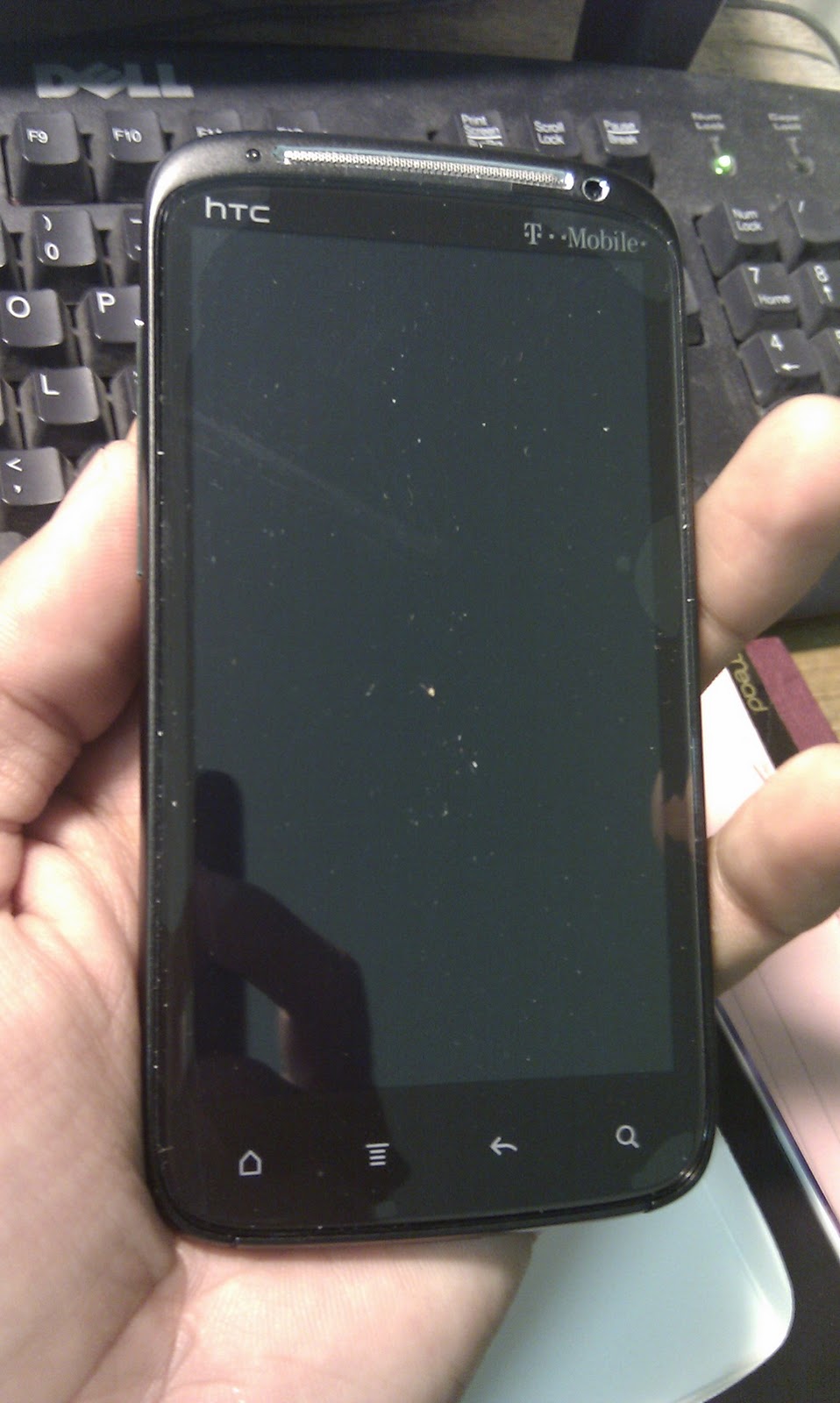 |
| Not terribly bulky. |
 |
| Fits nice and snug in my hand and the grip on the back allows it to feel secure. |
Thursday, November 3, 2011
HTML Made Easy Html Tutorials : Html Tutorials In Web Design
So I am thinking of getting into Web Design simply because I refuse to believe it is that hard to learn. Granted, I don't want to be able to design immensely complex websites, but it would be nice to be able to help out friends, family, my small business, and the non-profit organization that I do part-time work for. I found this very helpful guide/tutorial here http://www.accessv.com/~email/webpages/index.html that with a little time and effort, anyone can understand and become a Html novice. Just one of many interests that have always sparked my curiosity. Be sure to check it out. If you are one of those people who prefer actual paper, then you can get the book here: HTML Made Easy Html Tutorials : Html Tutorials In Web Design.
Wednesday, October 26, 2011
Android, oh Android...where for art thou Android?
Well, after about a week of enjoying my new HTC Sensation 4G Android phone, I decided to return it to WireFly.com due to a glitch with the camera. Well, I made an honest mistake of dropping off a FedEx Ground package in a FedEx Express dropbox and somehow my package has managed to disappear over the course of the last 3 weeks! After several calls to FedEx that brought me to the brink of having a coronary, I have discovered that FedEx makes it all too easy for their packages to get "misplaced". It turns out that (even though they belong to the same company) FedEx Express drivers DO NOT have to capability to scan any FedEx Ground packages that get accidentally dropped off at one of their drop boxes. So, in essence, your package is unaccounted for until it gets scanned at a FedEx Ground location. Which could mean it's essentially lost for a few days.
Turns out that FedEx won't take responsibility because my package never got scanned, so it's technically NOT in their posession. WireFly won't take responsibility, because their insurance plan doesn't cover these type of losses. I am S.O.L because the only proof that I have is the tracking number that I have from the packing slip. All in all, it's been one heck of a nightmare due to the irresponsibility of FedEx employees, along with a mistake on my part. Luckily, I've had that little HTC HD2 Windows phone that I've loaded Android Froyo on. This little phone is quite amazing. It's almost 3 years old and is still one of the most versatile out on the market. You can customize it like no other. You can put Windows 7, a mobile version of Linux, or any flavor of Android that you wish. You can either run the other OS from your SD card or install it on NAND memory. I have not replaced the cracked screen on it, but will be taking on that project soon since I've already got my hands on the replacement parts. I also have another HD2 that I will be replacing the USB/charging port on.
Hope you guys learn from my mistakes when shipping out any packages through FedEx. As for myself? I'm the type that once another business or organization leaves a bad taste in my mouth, I try to NEVER do business with that organization again if I can help it.
As always, any comments, questions, complaints, or rants are welcome!
Turns out that FedEx won't take responsibility because my package never got scanned, so it's technically NOT in their posession. WireFly won't take responsibility, because their insurance plan doesn't cover these type of losses. I am S.O.L because the only proof that I have is the tracking number that I have from the packing slip. All in all, it's been one heck of a nightmare due to the irresponsibility of FedEx employees, along with a mistake on my part. Luckily, I've had that little HTC HD2 Windows phone that I've loaded Android Froyo on. This little phone is quite amazing. It's almost 3 years old and is still one of the most versatile out on the market. You can customize it like no other. You can put Windows 7, a mobile version of Linux, or any flavor of Android that you wish. You can either run the other OS from your SD card or install it on NAND memory. I have not replaced the cracked screen on it, but will be taking on that project soon since I've already got my hands on the replacement parts. I also have another HD2 that I will be replacing the USB/charging port on.
Hope you guys learn from my mistakes when shipping out any packages through FedEx. As for myself? I'm the type that once another business or organization leaves a bad taste in my mouth, I try to NEVER do business with that organization again if I can help it.
As always, any comments, questions, complaints, or rants are welcome!
Thursday, October 6, 2011
Android blues...
Well, I was happy for a few days when I received my HTC Sensation 4G phone in the mail. Was it everything I had heard and more? Yes....then, slowly...no. First of all, be sure to do alot of research before updating to an Android phone. Find out how you will be able to transfer all of your SMS messages, calendar appointments, pictures, music, etc. Luckily, WireFly now offers free (up to 2GB) online backup. You can transfer your contacts using a Google account as well. This phone seemed to be totally awesome...until I noticed some issues with the camera/camcorder. They wouldn't work. They would give me a black screen and now they just open up and shut down immediately. One of the drawbacks with doing business with an online company such as WireFly is that there is nowhere you can physically go to and talk to a person (or raise hell, if you wish to do so) face to face. All communication is done either on the phone, through email, or through online chat. I've been busy moving to a new apartment as well so I haven't had alot of time to be on the phone for about an hour waiting for someone to help me. I did get the Gold insurance through them so I don't expect I'll be having much trouble in getting a replacement phone. The other HTC phone I got for $40 on the other hand, is running without a glitch! The irony! It ended up being an HD2 Windows phone. It was quite easy to load Android Froyo 2.2 on it using a custom ROM. It runs amazingly fast. From what I've read, even though this phone is about 2 years old, it is still one of the most popular because you can run Windows (which by the way is coming out with the updated OS, Windows Mango soon), Android, and a smartphone version of Linux. Everything runs quite good on it, including the WiFi hotspot. I'll have some pictures and updates to the status of my Sensation 4G soon. As always, comments, suggestions, questions, and rants are welcome!
Samsung R480 take apart
Well, I had another interesting task of taking apart a Samsung R480 notebook/laptop. In this situation the customer thought the case was broken since someone had dropped it. Luckily for him, upon opening the laptop, I found that some parts just had to be realligned and I reinforced them with some E6000 hobby epoxy. I didn't find that many walk through videos on the Internet for taking apart this laptop so I at least wanted to provide some pictures to show my work for anyone who would want to undertake a similar task. I've found that Samsung laptops are quite easy to work on so you shouldn't have a hard time doing this.
For this project I used:
I started by removing the battery and the cd rom. There are some silver screws under the battery and that are visible once you remove the cd/dvd rom as well.

 <There are a couple of other screws to remove.
 <Now flipping the laptop over, we have to release the tabs to remove the keyboard.
Once you release the keyboard tabs and gently pry up the keyboard, you should see the attached keyboard and touchpad ribbon cables. Carefully disconnect these as follows:


 <The metal hinge screws
 Plastic hinge covers>
 <VGA camera cable.
For this project I used:
- Laptop screwdriver set
- Plastic spudgers (find 'em here). These come in handy for opening various electronics
I started by removing the battery and the cd rom. There are some silver screws under the battery and that are visible once you remove the cd/dvd rom as well.


 <Now flipping the laptop over, we have to release the tabs to remove the keyboard.
Once you release the keyboard tabs and gently pry up the keyboard, you should see the attached keyboard and touchpad ribbon cables. Carefully disconnect these as follows:


Now that we've got the keyboard out of the way, we can proceed to prying open the case.

Once you have the casing open, you can proceed to disconnect the wifi wires and the lcd cable from the motherboard.

Now you can proceed to remove the hinge screws that hold the lcd/bezel/screen assembly onto the base. Start off with the one on the right. It's hidden away underneath a USB board, so remove the screw for the board and gently pull the board out.

Now remove the right hinge screw and then proceed with the left one.


Be sure to keep all of your screws in order by labeling them and setting them up in a way that will help you remember how to put which ones back where you got them from. In my case I simply label a sheet of notebook paper and use scotch tape to attach the screws.

You shold be able to remove the lid/screen assembly away from the rest of the laptop now. We have to pry open the bezel as well. There should be six little rubber "feet" that keep the lid from closing down completely onto the base and damaging the screen. Remove these little rubber feet and you'll find some screws that you must remove.

I'm using the spudger tool again to pry open the bezel around the screen.

Once you've pryed open the bezel, the metal hinges are exposed along with the screws that hold 'em in place and the plastic hinge covers. In my case, I had to readjust those plastic hinge covers, reenforce them with E6000 epoxy, retighten the metal hinge screws, and reallign the wifi antenna wires as well as the vga camera cable.


Closer look at the VGA camera cable. 

I hope this picture walkthrough helps somebody out. Again, any questions, comments, or suggestions are welcome! : )
Gateway 610....finished product
I finally got to finish that culprit of a pc, the Gateway 610 media center pc. I took some pics of a few steps and procedures. If you guys ever need any advice on how to undertake a similar project, just shoot me an email. I can honestly say I feel good about accomplishing something like this. I hope the customer is satisfied with it. This pc does have something good about it. It's sound is awesome! I guess all that power the little subwoofer is pulling isn't just for show. I've had this pc running an online radio service and have been having it on full blast rocking out to some Red Hot Chili Peppers and some Guns N Roses. Some of the tools and materials I used were:

The culprit...Gateway 610 ALL-IN-ONE media center pc

The source of the problem. This VER. 0.0 PSU is underpowered for all that the pc has to offer.

Here is the replacement PSU. I know, I know...it's ugly and bulky. Well, that's nothing a little elbow grease and some imagination won't can't fix.


 Some pics of the painted PSU case. I chose
a nice glossy black color.


- Heat shrink tubing
- Heat gun
- Spray paint primer and paint
- Philips and flathead screwdrivers
- Needle nose pliers
- Wire cutters
- Wire strippers
- Soldering iron
- Solder, flux, and metal braid
- Electrical tape
- Plastic cable clamps (to hold down and anchor the wires)
- E6000 hobby glue/rubber cement

The culprit...Gateway 610 ALL-IN-ONE media center pc

The source of the problem. This VER. 0.0 PSU is underpowered for all that the pc has to offer.

Here is the replacement PSU. I know, I know...it's ugly and bulky. Well, that's nothing a little elbow grease and some imagination won't can't fix.

Here's another look at the replacement PSU.

Here's a look at the back of the 610 Media PC with the old PSU, subwoofer, and back panel removed. That's the little subwoofer on the left. It actually sounds very good.

Took the PSU apart. I prepped the case for painting by sanding it down and using a paint primer.


a nice glossy black color.

Here you can really see the nice look of the glossy paint.

Here is the PSU taken apart and I am getting ready to cut and solder the wires together.

I had to recall my old soldering skills. Not too bad for not having done this in a while.

Here, I used the heat shrink tubing to protect the solder points.

Using the heat gun on the 3/4" heat shrink tubing. This bigger tubing was used to conceal all the wires.
**Use extreme caution when using a heat gun**
The following are pictures of the finished PSU put back together:


Here, I jimmied the power connectors from the Gateway 610 onto the connector for the PSU. Do you see how they split up the 20 pin connector into 2 connectors? The 4 pin 12V power connector is at the top.

Here, I'm securing the connectors with a little E6000 hobby rubber cement. It's not something that's permanent but it will hold up pretty good.
The final product:

Hope you guys enjoyed this little novela and the pics. I have to give credit where credit is due. I could not have done this without a wonderful step-by-step take apart guide that I found here. I also have to give recognition to my favorite electronics parts store EPO (Electronics Parts Outlet). They've been a staple in the Houston community for electronics enthusiasts as myself and for hobbyists.
Subscribe to:
Posts (Atom)